
3a: Work Coordinate Systems
| Name | Fusion WCS Offset | Haas CNC Work Coordinate |
| Houghton D. | 45 | G154 P39 |
| Altshuler D. | 46 | G154 P40 |
| Hajduk A. | 47 | G154 P41 |
| Elizabeth Gerner | 48 | G154 P42 |
| Mark Pearcy | 49 | G154 P43 |
| Tyler Drummey | 50 | G154 P44 |
| Andrew Ruihan Sun | 51 | G154 P45 |
| Adrian Diaz | 52 | G154 P46 |
| Emmet George | 53 | G154 P47 |
| Elizabeth Savage | 54 | G154 P48 |
| Maddie Ocampo | 55 | G154 P49 |
| Annie Gilliam | 56 | G154 P50 |
| Logan Wang | 57 | G154 P51 |
| Elizabeth Whalen | 58 | G154 P52 |
| Cassius Reed | 59 | G154 P53 |
| Milo Mizner | 60 | G154 P54 |
| Carter Knowles | 61 | G154 P55 |
| Yuvika Merotha | 62 | G154 P56 |
| Luca Jacobson | 63 | G154 P57 |
| Aviv Teva | 64 | G154 P58 |
| Ava Pihlstrom | 65 | G154 P59 |
| Ella McDonald | 66 | G154 P60 |
| Prosper Castelli | 67 | G154 P61 |
| Jordan Angstreich | 68 | G154 P62 |
| Cal Chang | 69 | G154 P63 |
| Ben Korzenik | 70 | G154 P64 |
| Dylan McGinty | 71 | G154 P65 |
| Tenzin Dilgo | 72 | G154 P66 |
| Jessica Berger | 73 | G154 P67 |
| Ben Newman | 74 | G154 P68 |
| Dan Rodriguez Rey | 75 | G154 P69 |
| Hamdi Osman | 76 | G154 P70 |
| Babe Brown | 77 | G154 P71 |
| 78 | G154 P72 | |
| 79 | G154 P73 | |
| 80 | G154 P74 | |
| 81 | G154 P75 | |
| 82 | G154 P76 | |
| 83 | G154 P77 | |
| 84 | G154 P78 | |
| 85 | G154 P79 | |
| 86 | G154 P80 | |
| 87 | G154 P81 | |
| 88 | G154 P82 | |
| 89 | G154 P83 | |
| 90 | G154 P84 | |
| 91 | G154 P84 | |
| 92 | G154 P84 |
Work Coordinate Systems can be confusing. So take a moment to learn about why they are the way they are.
If life were simple, there would only be 1 Work Coordinate System, and I would use it all the time. And I would never let you, or anyone else use my precious equipment, because I would worry too much that your work would crash into my work.
But life isn’t this simple. There are a lot of us using the same equipment (the Haas Super Mini Mill) so let’s make it possible for each of us to have a Work Coordinate System to call our own.
Take a look at my WCS (my Work Coordinate System). In Fusion, for every CAM setup I make (as Daniel Houghton), I’ll enter 86 as my WCS…
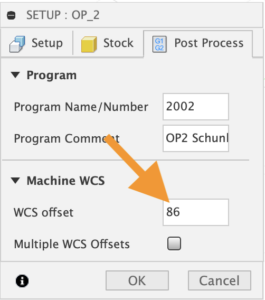
…so that when I post my gCode I activate the G154 P80 work coordinate system on the Haas Super Mini Mill.
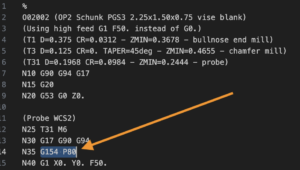
So 86 in Fusion becomes G154P80 on the Haas Super Mini Mill. Weird.
Why are there two, seemingly arbitrary, numbers to memorize here? Well, we are coordinating between software and hardware. Each of us is using Fusion as our software and the Haas Super Mini Mill as our hardware.
Ok. But why didn’t they make the numbers the same? Why didn’t they make it so that 86 in Fusion generates 86 in gCode? Wouldn’t that make it easier to coordinate? Well, we are coordinating between software and hardware, and there are lots of different hardware manufacturers in the world. Haas is one of them. And Haas dedicated a portion of the controller memory to 6 Work Coordinate Systems: G54, G55, G56, G57, G58 and G59.
And at that moment in time they thought, that’s plenty! Who would ever need more than 6 Work Coordinate Systems? Who would ever teach a class with more than 6 people in it? But the world of manufacturing continued to evolve. And its evolution became more complicated. And with those complications came the need for even more than 6 work coordinate systems. But where in memory should they go? G60 would be the logical next spot, but G60 was already claimed in controller memory. And so was G61, G62, G63 and so on…
So the designers carved out an additional block of memory in the next spot where there was room for LOTS of work coordinate systems, and the memory that was available at that moment was G154. And at that moment in history it seemed that 99 additional work coordinate systems would be enough. So 99 memory slots were set aside for this purpose, and they were called G154 P1, G154 P2, G154 P3 and so on up to G154 P99.