
Overview
This gear can feel complicated! That’s why we offer friendly training for beginners and require everyone (even the experts!) to complete it before doing any project work.
To complete the training, follow these steps:
- Sign the Pledge. You only need to sign the pledge once your very first time using the Makerspace.
- Come to the Makerspace during Open Hours.
- Check the Calendar to find Open Hours.
- There might be other events listed, so stick to the ones that say “Open Hours with …”
- Complete the training for each piece of equipment at your own pace.
- Some equipment has a prerequisite. If so, it’ll be clearly marked “Prerequisite: ” followed by the equipment that you need to train on first.
- Some of the equipment has a moment listed where you need to locate the Makerspace Monitor. Make sure you can find the Monitor and that you know their name before proceeding.
- Await an email response from a monitor or the Makerspace Manager that your training submission has been reviewed and accepted. The response might be that you’ve haven’t quite completed the training even though you think you’re done. Common reasons for this are:
- The reviewer can’t open your link because it’s not an actual link.
- Here’s a tutorial on basic Digital Skills needed to do the rest.
- The reviewer can’t open your link because you didn’t allow anyone else to view the contents of the link. So make sure to make it public.
- For example, this link is not viewable by the reviewer:
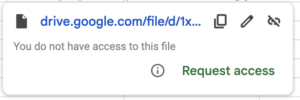
- For example, this link is not viewable by the reviewer:
- The reviewer can’t determine that you understand the fundamental safety and technical requirements of the equipment. Make sure that you’re photo clearly depicts what the training is asking for.
- The reviewer can’t open your link because it’s not an actual link.
- If you hear back that you’re not quite done with the training, don’t worry! You’ll get simple feedback on the missing pieces and you’ll be officially trained in no time. Just work with the reviewer until you’re both confident that you’re done.
- Look for your name and checkmark by the equipment you trained on in the training log. When you see the checkmark by your name you are trained and welcome to do project work on that equipment. All the trainings take a day or so to be reviewed and entered in the log, so please be patient with this process.
- If you don’t see the checkmark for the equipment you want to use, work with the monitor to figure out why, and wait to use the equipment until you’ve got this resolved.